Q3 2025
Scaling Patch's sourcing platform from 300 to 25,000 projects
TL;DR Patch grew its sourcing data from 200 to 25,000+ carbon projects. I led the redesign that turned an unusable pile of data into a market buyers and in-house experts could both navigate.
12,400% growth in projects
30-80 data points per project
before
~0
after
0+
About Patch and the product
Patch's core value is data and expertise, delivered to customers through a product that helps buyers and sellers of carbon credits work through the complexity of environmental commodities markets. It needs to serve two primary sets of users:
- Experts, who build procurement programs from strategy to tracking, run diligence and quality assessment, and source inventory.
- Buyers, who move through procurement stages and rely on expert recommendations and data inside the platform.
That makes Patch's product a two sided pane of glass where experts and credit buyers meet to procure environmental commodities. The process is dense and data heavy. It often involves buyers who do not yet have deep climate expertise, in a market that is relatively new and constantly evolving, and that is balancing the environmental moment with a tough integrity battle. That two sided pane of glass idea shows up directly in the structure of the product: experts and buyers work in the same sourcing surface, but see different levels of detail depending on their role and where they are in the deal.
Frame: why we had to change
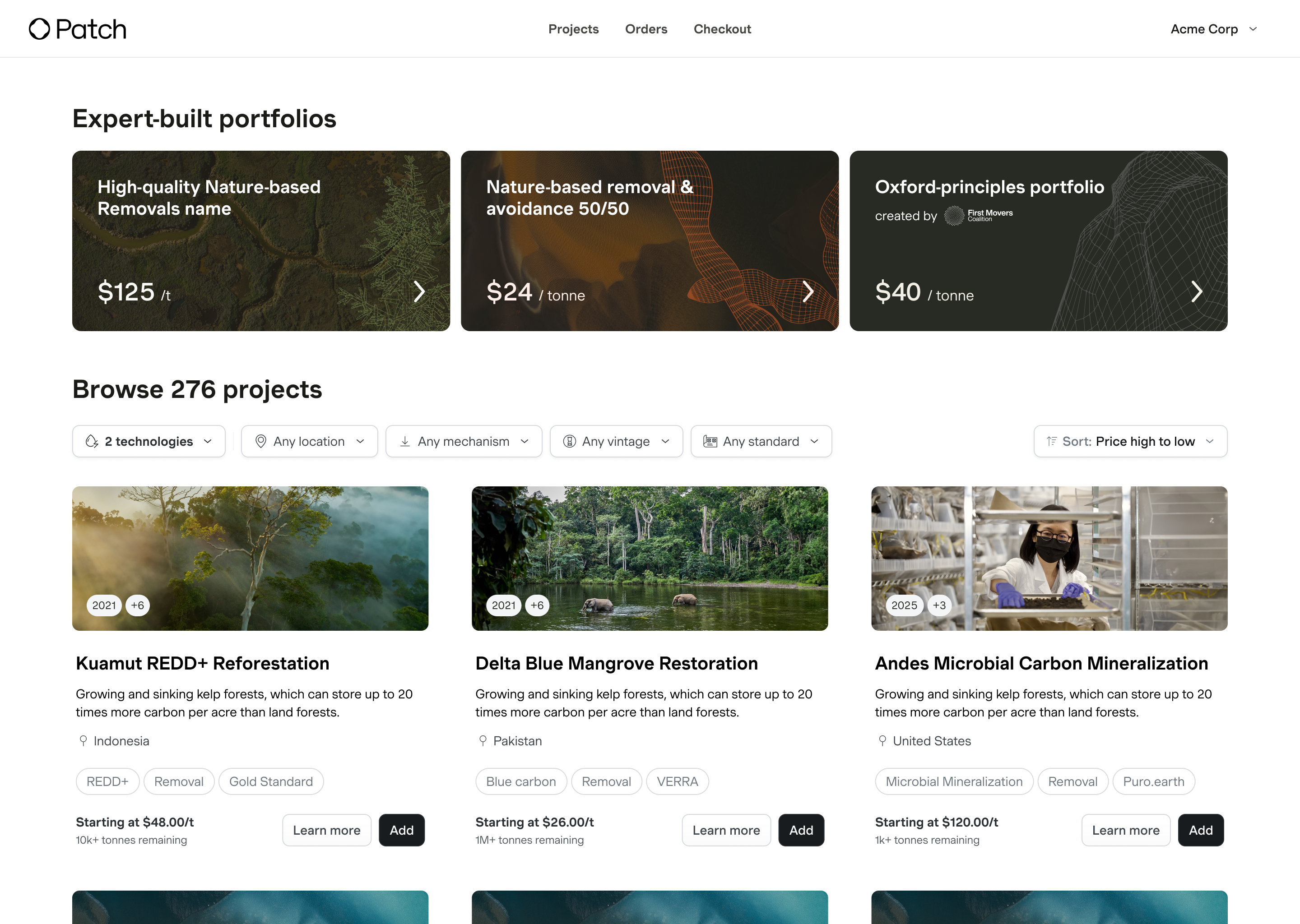
One key space in the product is the sourcing platform, the main surface where users explore available inventory and projects. It is where experts assemble recommendations and where buyers see and react to them.
By late 2025, as Patch moved upmarket into mature enterprise customers, we expanded data availability from a curated set of roughly 200 to 350 projects to around 25,000 projects covering the major registries. We got there gradually over the year as we integrated additional registries and partners, but the result was a step change in scale from a curated catalog to a market level view.
From a market perspective, this was necessary. Enterprise buyers were not satisfied with a vendor curated set. A carbon purchase is often a multi year, multi million dollar commitment, and buyers have to defend it internally. "Here is everything we considered" lands very differently than "here is what a vendor showed us."
From a design perspective, the original brief came in as a medium scope front end project to improve browsability. We now had over a hundred times more data, so the ask was more filters, better sorting, and stronger search. On paper, that sounded reasonable. I was fairly sure it did not address the real problem.
Reframing the problem
The first hint was inside the company. Our climate experts had quietly stopped using the product and moved their real work into Excel. The spreadsheet, not the app, had become the place where inventory lived and where sourcing and diligence work actually happened.
They were not leaving because the interface looked dated. They were leaving because the data underneath could not support real diligence, and a spreadsheet they controlled could. As we moved upmarket, that stopped being an internal quirk and started to look like a preview. Enterprise buyers bring their own climate experts. They were about to hit the same wall.
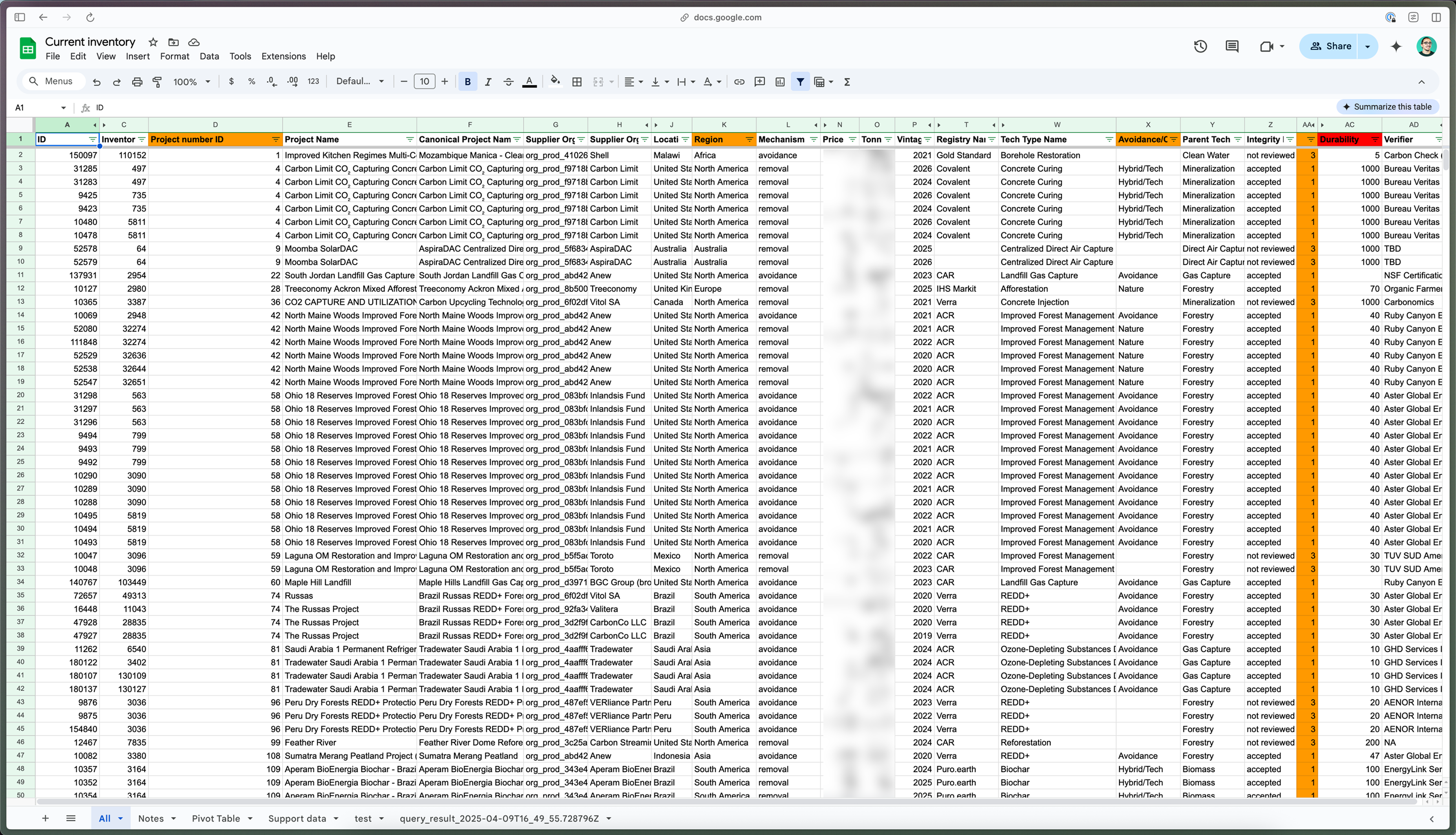
Those 25,000 projects came from many different registries and third party partners, each describing things in their own way. The same technology might be labeled several different ways. The same fact might be reported in different formats, or not reported at all. We had many raw signals, but not all of them were actionable on their own. In many cases we could not reliably tell if a project was still issuing credits, whether we could actually source it, or what it might cost. A better UI on top of that would just help people browse an unreliable market faster.
My other challenge was that an internal signal is easy to downplay. We had been punting on a proper fix for our teams for a while but never got to it. The rationale was always that our experts are power users, buyers are different, and maybe buyers would not care as much. Before we spent engineering time on that assumption, I designed an early version of the new sourcing platform in Figma Make, using realistically structured mock data that reflected the real registry inputs and inconsistencies.
Figma Make and the wonders of truly interactive prototypes, at a fraction of the cost, were a huge unlock for Patch, given how often we had to design for real, messy data use cases. A static mock cannot expose a data problem because it does not have to live with the data. It is too easy to ignore the gaps, either willingly or because you do not yet have a sense of what real data will expose. A functioning prototype, even a scrappy one, lets you see how people behave when they are faced with actual structure and constraints. As was typical at Patch, we brought these prototypes into live customer calls with our sales team and watched buyers try to use them.
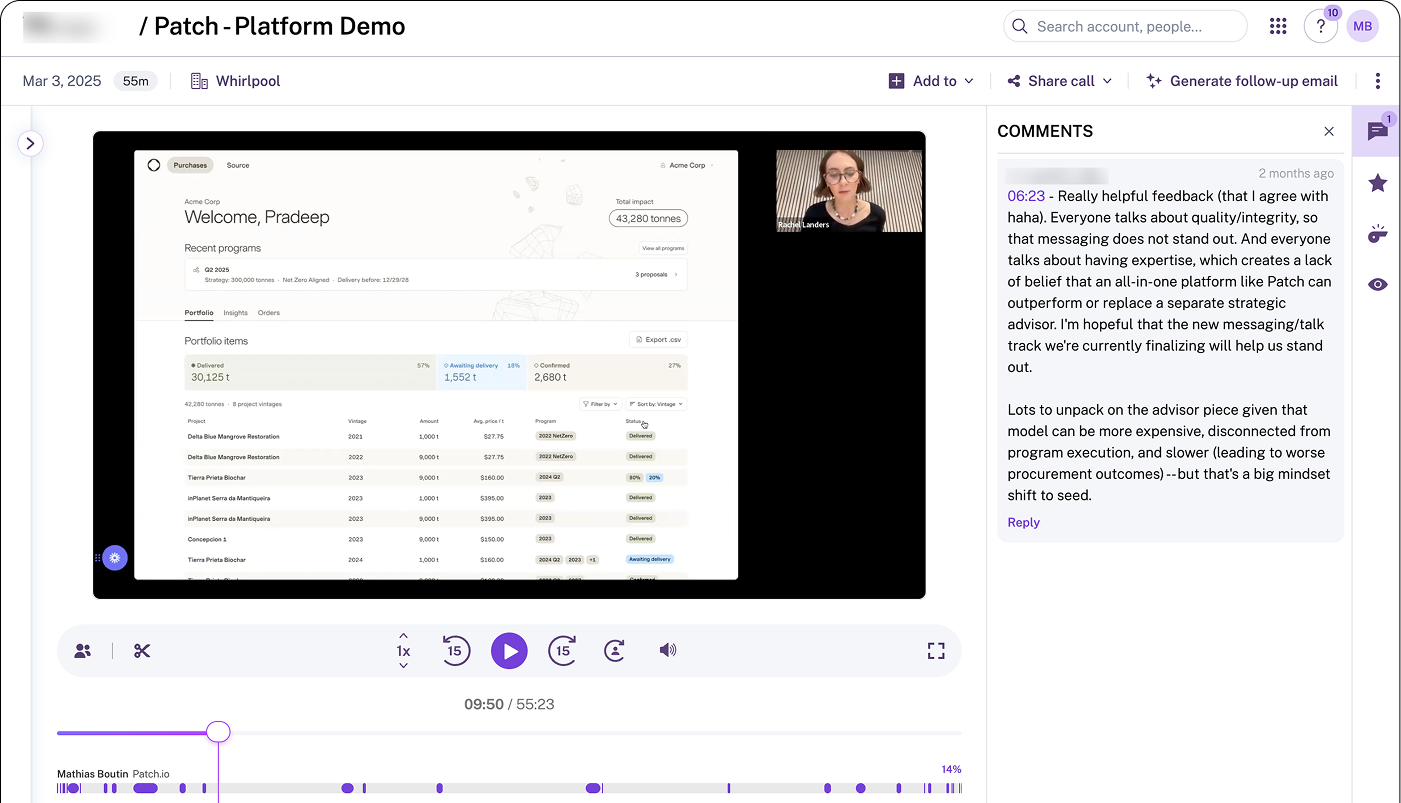
The failure modes showed up immediately. Buyers could not tell why one project ranked above another. They could not find the facts they cared about at the right time in their process. They did not fully trust what they were seeing. It mirrored what we had already seen internally: the same issues that pushed our experts into Excel were landing on the people this brief was supposed to serve.
The prototype was there to make the cost of the wrong plan visible to the people making roadmap decisions. We had one or two engineers available. Fixing the data meant delaying the visible UI work everyone thought they were getting, so the argument had to be concrete enough to change minds. I used those sessions to align our PM, engineering lead, and commercial leadership on pausing the UI work and investing first in the data model.
We decided to increase the scope to shape the data and the UI at the same time, delivering the data expansion the business needed while making sure it would solve customer problems.
The challenge: a system, not a single screen
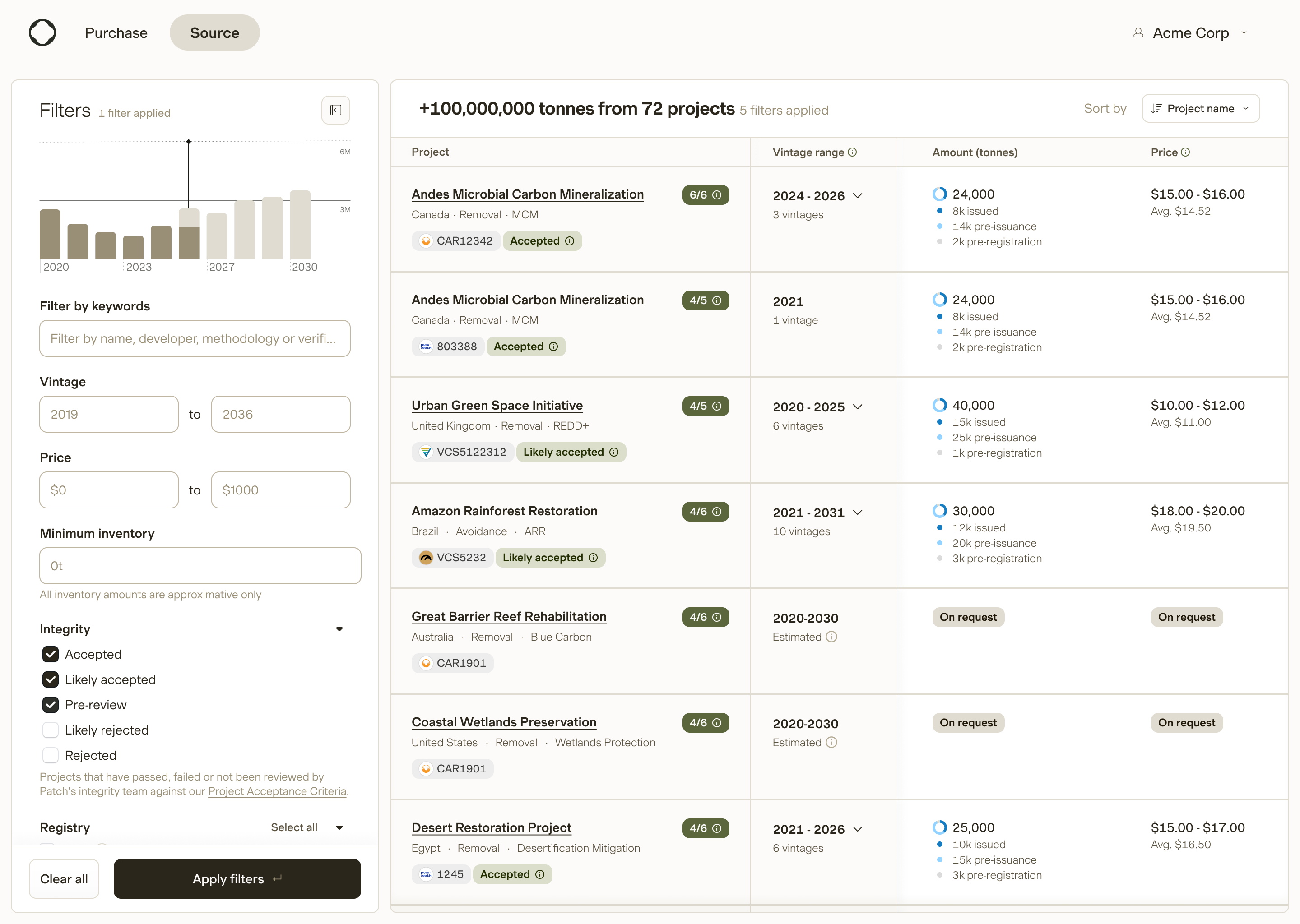
There was also straightforward design complexity. We were now asking people to navigate a dataset of about 25,000 rows, each with 30 to 80 dimensions of different types. The interface had to support different phases of procurement, such as:
- Early specification, when buyers define what they want to procure.
- Diligence, when experts and buyers assess the risk profile of projects against criteria and risk appetite.
- Sourcing and negotiation, when availability, contracting requirements, and other commercial details matter more.
Experts and buyers care about different pieces of information at different phases. That created information architecture challenges: what to surface, what to nest, how dense the interface should be, and how to aggregate data into elements that feel actionable instead of overwhelming.
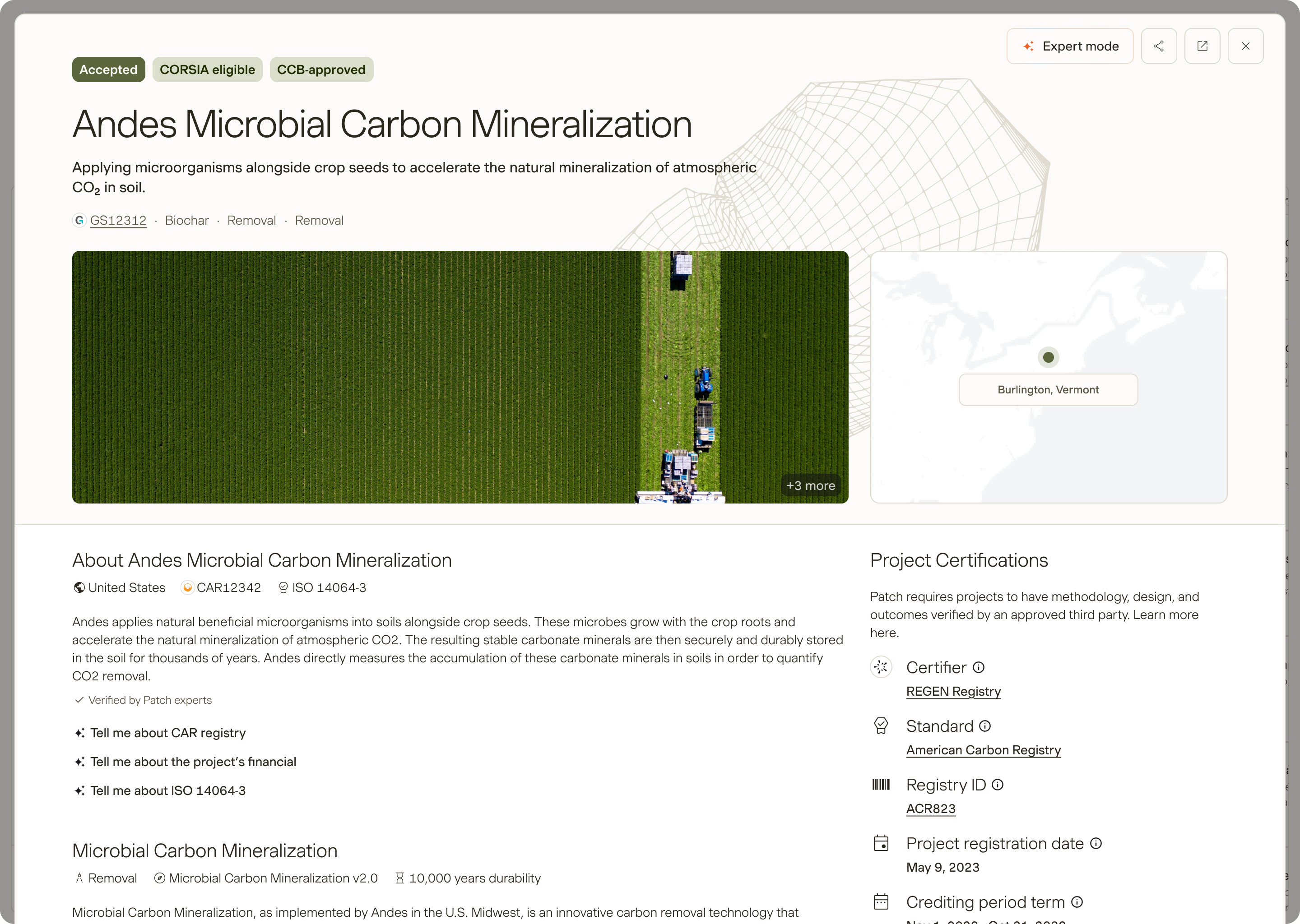
We also needed the surface to scale. As we acquired more data and learned which dimensions people actually used, the UI had to be flexible enough to absorb new fields and composite signals without a full redesign every time. I wanted engineers to be able to clean and extend the data model, and in many cases adjust what showed up, without needing to pull design back into every small change.
At the UI level, that meant being deliberate about how information was grouped and weighted. Fields that answered the same user question needed to live together. Within each group, we spent time on hierarchy and visual cues so important signals were easy to scan, and secondary details stayed readable but did not compete for attention. The goal was that, over time, as people worked in the platform, these patterns would become recognizable and the surface would feel learned rather than new on every deal, even as we added more data.
To move quickly, I relied on scrappy, interactive prototyping in Figma Make, again with realistic data. Prototyping this way is especially useful for data projects. Stakeholders and customers can click through live, browsable lists instead of trying to imagine behavior from static screens. In internal reviews, getting product, engineering, design, and commercial stakeholders to look at the same prototype made alignment, and misalignment, much more obvious than abstract conversations would. I intentionally hit prototypes early to expose those gaps while it was still cheap to course correct.
Once the Figma Make prototypes had done their job, I turned them into real specs. Being able to rely on design intuition and experience in that part was key. There are many ways I could have diverged on the UI and UX treatment for this interface, but the business reality meant we had to move quickly. Strong design system work we had done beforehand paid off massively here, and identifying which pieces required new UI was the balance we needed to strike to meet our objectives while keeping to our timelines.
Shaping the data model
Those prototypes also made our product gaps obvious, especially around the shape and usefulness of the data.
We were aggregating raw fields from registries and partners. Combined, they contained a lot of noise. Transparency and clarity are separate challenges. Good architecture is as much about what you withhold as what you surface, and how.
One gap we identified was around the sourcability of any given project. We had separate signals like issuing periods, issuance amounts and dates, supplier and developer contacts, retirement details, and registration status. On their own, these data points did not answer a buyer's core question: "Can I actually buy this, and how soon."
Early prototypes exposed this. When we surfaced all the raw fields, customers either got stuck or pulled the data out to reason about it offline. We worked with engineering and our climate experts to shape those inputs into a simple sourcing indicator. That signal combined the underlying data to represent how likely it was that a given project was actually sourcable and purchasable.
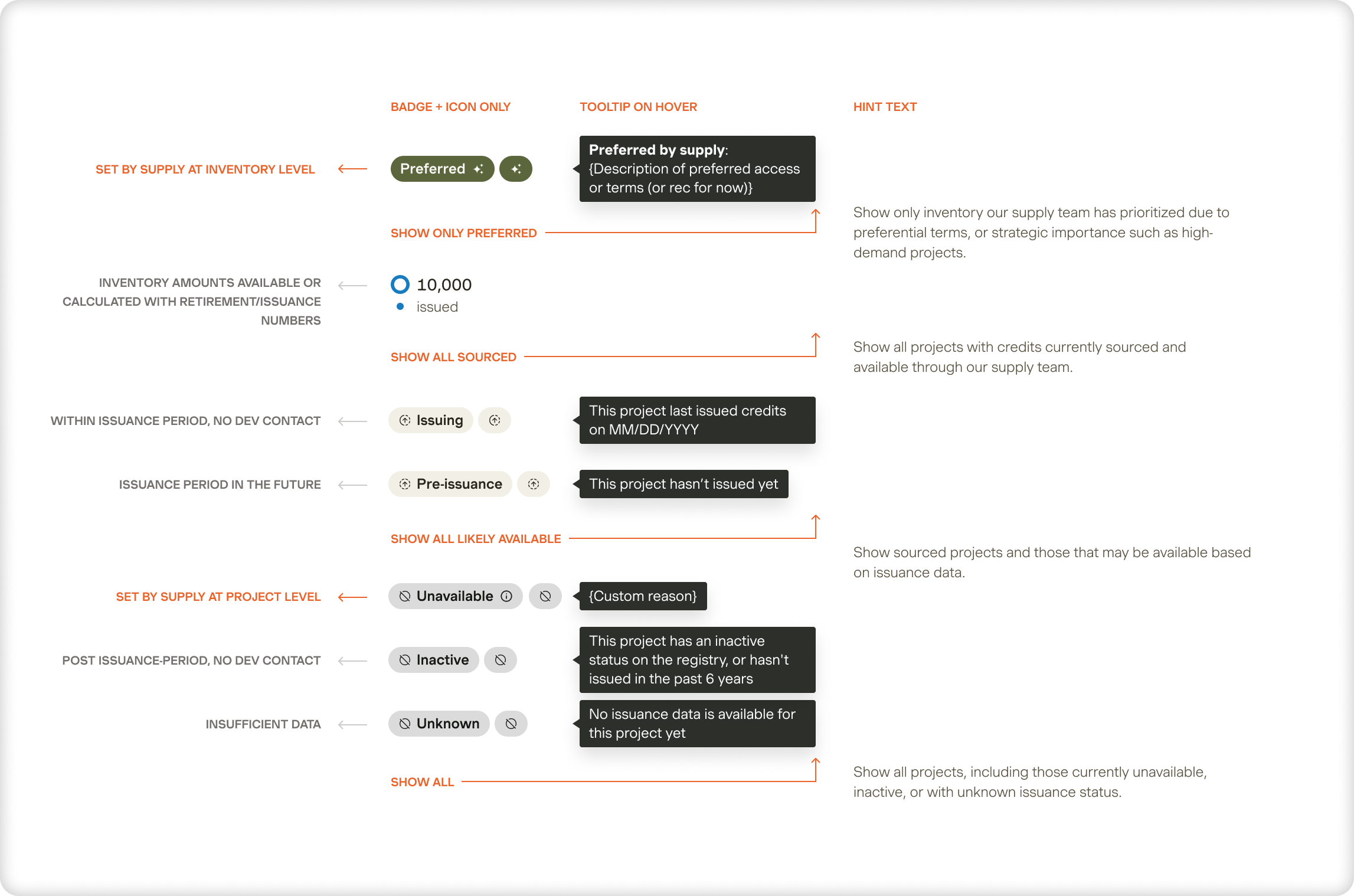
Design's value here was in making the gaps intensely clear, then channeling what we heard from customers into concrete data requirements. Data is only as useful as it is actionable. By grounding the model in the decision buyers were trying to make, we helped the team prioritize which fields to standardize, which composite signals to create, and which raw data to keep one level down.
We sequenced the work accordingly. Design first shaped the model from the consumption side: what experts and buyers needed to see, in what combinations, to make real decisions. Engineering then layered in constraints and built indexing and infrastructure suited to this scale.
AI supported the process, but not as a shiny feature and not as a black box. Reconciling inconsistent labels and categories across tens of thousands of projects would have eaten the entire timeline for a one to two engineer team. AI made that reconciliation feasible. For example, we used AI to cluster and normalize technology labels across registries, while routing edge cases like novel methodologies or mixed category projects to our climate experts. Because we understood the industry context, we could mark areas where calling two things "the same" was actually a hard climate question rather than a pattern matching task. AI handled the volume and experts handled the truly judgment heavy decisions.
Contextualizing: making relevance obvious
Once the data was usable and consistent, we still had a second problem. Buyers did not care about all dimensions equally. They cared about different combinations of fields depending on their goals and constraints.
For example, some buyers cared deeply about availability timelines. Others focused on technology type, location, or third party ratings. Many operated under the requirements of specific climate certifications, each with its own rules. Some wanted projects co located with their supply chain, or technologies that felt narratively connected to their industry.
Surfacing all dimensions all the time was not an option. It would have recreated the "Excel wall" inside the product.
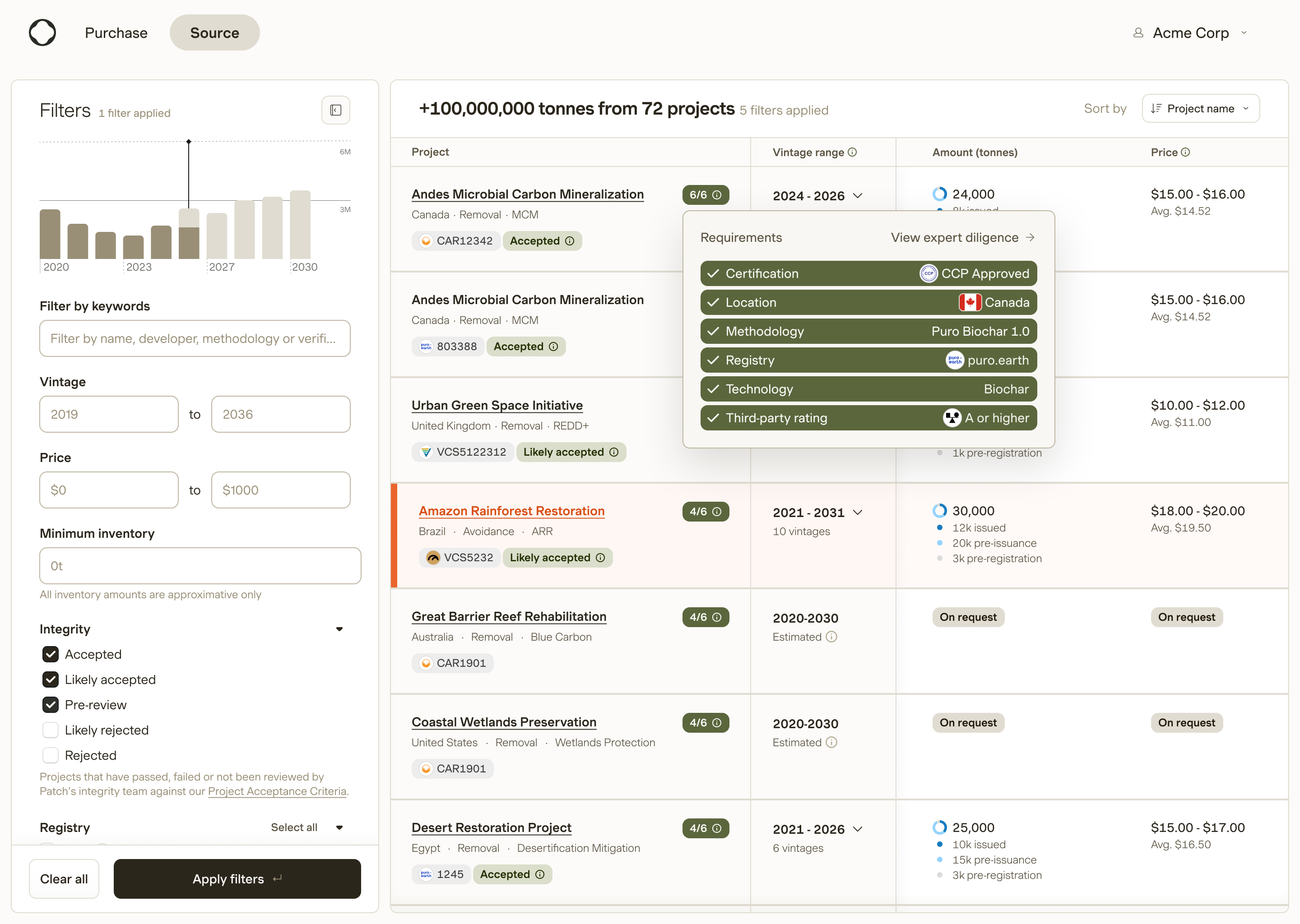
For this, we built a scorecard type interface directly into the results. Buyers would express their spec up front. The scorecard cross referenced that spec with each project's dimensions and then:
- Sorted projects by how well they matched that buyer's criteria.
- Surfaced the project's match to a spec with a simple score that could be hovered to view the full match breakdown.
This started as a scrappy Figma mock and quickly became one of the most useful UX patterns in the platform. It made the connection between "what I said I care about" and "what I am seeing on screen" explicit, without forcing buyers to manually manage filters for every slice of the market.
In parallel, we kept the core information architecture principle consistent. The main sourcing view surfaced decision making signals. The project detail view nested the deeper, expert level fields. Experts could read further down when the task demanded it. Role based access governed sensitive information like pricing and supplier details, but the underlying mental model stayed consistent.
Outcomes
I cannot share detailed metrics, given the nature of Patch's product. The clearest outcomes are organizational and qualitative.
If we had simply executed the original brief, we would have shipped a polished new UI onto a market that experts and mature buyers still could not fully trust. Internal teams would likely have stayed in Excel. Enterprise deals would still have stalled at diligence because buyers could not complete the work inside the product. The refactor would have looked good in demos and left the underlying system unchanged.
What actually happened was different. Internal teams came back first. The climate experts who had drifted to spreadsheets returned to the platform because it now reflected the way they thought and worked, and it made that work faster. Recommendations could be shaped around each buyer's spec rather than re assembled from scratch each time. Over time, the spreadsheet was deprecated as the primary workspace. For a designer, replacing Excel as the power user tool is a meaningful outcome.
On the buyer side, we saw deals move through diligence with fewer back and forth conversations about missing or unclear information, and buyers spent more of their time comparing options instead of chasing basic facts.
The sourcing platform also became the data hub that other functions relied on. Supply, sales, and operations all worked in it, tracking projects, updating them, and presenting them to buyers from the same source. That was the real return on shaping the data first. A surface alone does not pull three functions onto one system. A data model that each of them can trust does.
The hardest moment in the project was asking leadership to delay a visible UI refresh in favor of invisible data work. I came in expecting pushback, so I brought prototypes and specific failure examples from sales calls to keep the discussion grounded in how experts and buyers were actually behaving.
Reflexions
In this project, the value of design was not just about individual screens, UI and information architecture, it was also about how the system fit together. Design is so much more than the top layers of a product, and it's most useful when it can help at every level of it.
- 0 to 1 and reframing. I pushed back on a UI first brief and reframed the problem around data quality and model design, using scrappy prototypes and realistic data to make the risks visible instead of debating them in the abstract.
- Systems thinking. I treated the sourcing platform as part of a larger system that linked registries, internal experts, buyers, and other Patch teams, and used that lens to shape both the data model and the information architecture.
- Scoping and tradeoffs. With one or two engineers, I helped the team choose to invest in the data model first, accepting a slower, less visible path in the short term in exchange for a platform other teams could build on.
- Stakeholder management. I used interactive prototypes in live sales calls and internal reviews to align product, engineering, and commercial stakeholders around what success needed to look like for experts and buyers, not just for demos.
- Collaboration. I worked closely with climate experts to define where AI automation was safe and where expert judgment was necessary, and with engineering to ensure that the model we designed together was actually buildable within constraints.